Porchlight › How to play › Sea Battle
How to play Sea Battle
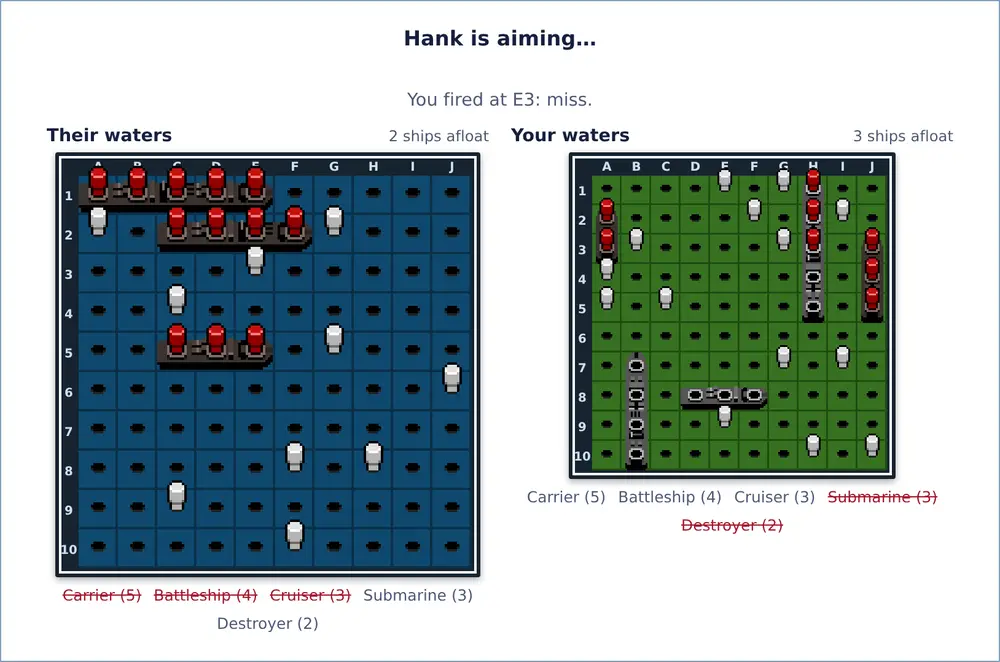
The pencil-and-paper naval game for two players. Each of you hides a fleet, then you take turns firing at squares in each other's waters.
The aim
Sink every ship in your opponent's fleet before they sink yours.
Setting up
Each player has a 10 × 10 grid of their own waters. Both fleets are placed at the same time, and neither player can see the other's.
A fleet has five ships:
| Ship | Length |
|---|---|
| Carrier | 5 squares |
| Battleship | 4 squares |
| Cruiser | 3 squares |
| Submarine | 3 squares |
| Destroyer | 2 squares |
Each ship lies in a straight line, across or up and down, never diagonally. Ships may touch but can't overlap.
Once both fleets are placed, a random draw decides who fires first.
Playing
On your turn, choose a square in your opponent's waters and fire.
- If part of a ship is there, it's a hit. Otherwise it's a miss.
- When every square of a ship has been hit, the ship is sunk. Both players are told which ship went down, and its position is shown.
- You can't fire at the same square twice.
- Turns normally alternate after every shot, hit or miss. The table can instead give an extra shot after each hit (see Table options).
Winning
The first player to sink the whole enemy fleet wins. There are no draws. Both fleets are revealed when the game ends.
Table options
| Option | Choices | Default |
|---|---|---|
| After a hit | Turns alternate, or Fire again | Turns alternate |
| Computer player | Easy, Normal or Hard | Normal |
| Turn timer | Normal, Relaxed (twice as long), Quick (half as long) | Normal |
With Fire again, each hit gives you another shot at once, and you keep firing until you miss. Ranked games always use the defaults.
On Porchlight
Placing your fleet. Your fleet starts in a random layout.
- Click a ship to pick it up, then click a square to move it there.
- Click the picked-up ship again, press Rotate, or press R to turn it.
- Shuffle gives you a new random layout.
- Press Ready when you're done. Ready stays grayed out while any ships overlap.
Firing. Click a square in your opponent's waters. With a keyboard, the arrow keys move and Enter fires. Your own waters are shown too, with every shot your opponent has taken. Each grid's heading shows how many ships are still afloat.
Computer players. Easy fires at random until it hits, then searches nearby. Normal searches in a checkerboard pattern and follows a line of hits until the ship sinks. Hard works out every way your remaining ships could still be lying and fires where they are most likely to be.
The turn timer. On a Normal timer you have 90 seconds to place your fleet and 30 seconds for each shot. If time runs out while you're placing, you get a random layout. If it runs out while you're firing, the computer takes that shot for you. If it runs out twice in a row, you forfeit the game. You also forfeit if you leave, or if your connection drops and you don't come back within about a minute.
Tips
- After a hit, try the four squares around it. Once you find a second hit, follow the line.
- Every ship is at least two squares long, so firing at alternate squares in a checkerboard pattern will still find every ship.
- When placing, don't always hug the edges or line ships up neatly. Spread them out and vary their directions.